1:1 sessions · jake + tanner

Tanner's Project

a running directory of what we built together — one page per session

A home for the things Jake and Tanner build together during their 1:1 sessions — half learning, half real engineering. Each session lives on its own page below: what was built, what was learned, and how the loop closed.

Newest at the top. Click into any session to listen to what came out of it, read the build notes, or scroll through the side-by-side feedback.

Upcoming · resources · coverage

Learning tracker

Next session starts by reviewing the agent Jake finished, then flips the driver seat so Tanner runs her setup and deploy while Jake coaches.

updated · may 27 · 2026

Started / covered

  • Picked the referral agent as the next real project.
  • Started with the UX slice before going deep on architecture.
  • Started the UI, hosting, and data-storage stack: Next.js, Vercel, Supabase, TypeScript, React, Tailwind, and shadcn/ui.
  • Built the referral-agent app shape: public interview flow, admin dashboard, Supabase schema, and ElevenLabs agent/tool configs.
  • Set up the real deployment path: GitHub repo, Vercel project, Supabase integration, and environment variable sync.
  • Used Claude Code plan mode and loaded the Vercel, frontend, and agents skills.
  • Touched the security question at a high level: what can be stored, who can access it, and what should stay out.

Next session focus

  • Review the finished agent from Jake first: what works, what changed, and what Tanner wants to carry into her own project.
  • Tanner drives: open her project, state what she is trying to ship, and decide the first setup step.
  • Get her machine organized into a sane project structure so files, repos, docs, and env files have obvious homes.
  • Connect the local project to GitHub: repo, branch, commit, push, and confirm what changed.
  • Connect the project to Vercel, add the needed environment variables, and deploy from the real repo.
  • Verify the live URL end to end, including the production branch, webhook URL, webhook secret, and any logs needed to debug.
  • Have Tanner explain the model back: what lives locally, what lives in GitHub, what Vercel deploys, and what never goes in git.

Parking lot

  • Cursor options: show Cursor, set up the Claude Code extension inside Cursor, and compare it to Claude Code in terminal.
  • GitHub workflow variants: solo commit and push vs. branch, PR, review, merge to main, and automatic Vercel deploy.
  • Runtime boundaries: local secrets, Vercel env vars, Supabase service keys, ElevenLabs webhooks, and browser-visible public config.
  • Terminal workflow habits: dirty worktrees, branches, commits, status checks, and when to let the AI coding agent drive.
  • Project sprawl prevention: habits for spinning up new projects, keeping experiments contained, and avoiding mystery folders.
  • If time permits, build an ElevenAgent via API with a live context dataset.

Infographics

simple · mental · models
github workflow

GitHub process map

The GitHub-specific mental model: local changes become a branch, the branch gets committed and pushed, the pull request becomes the review conversation, and main stays the official record.
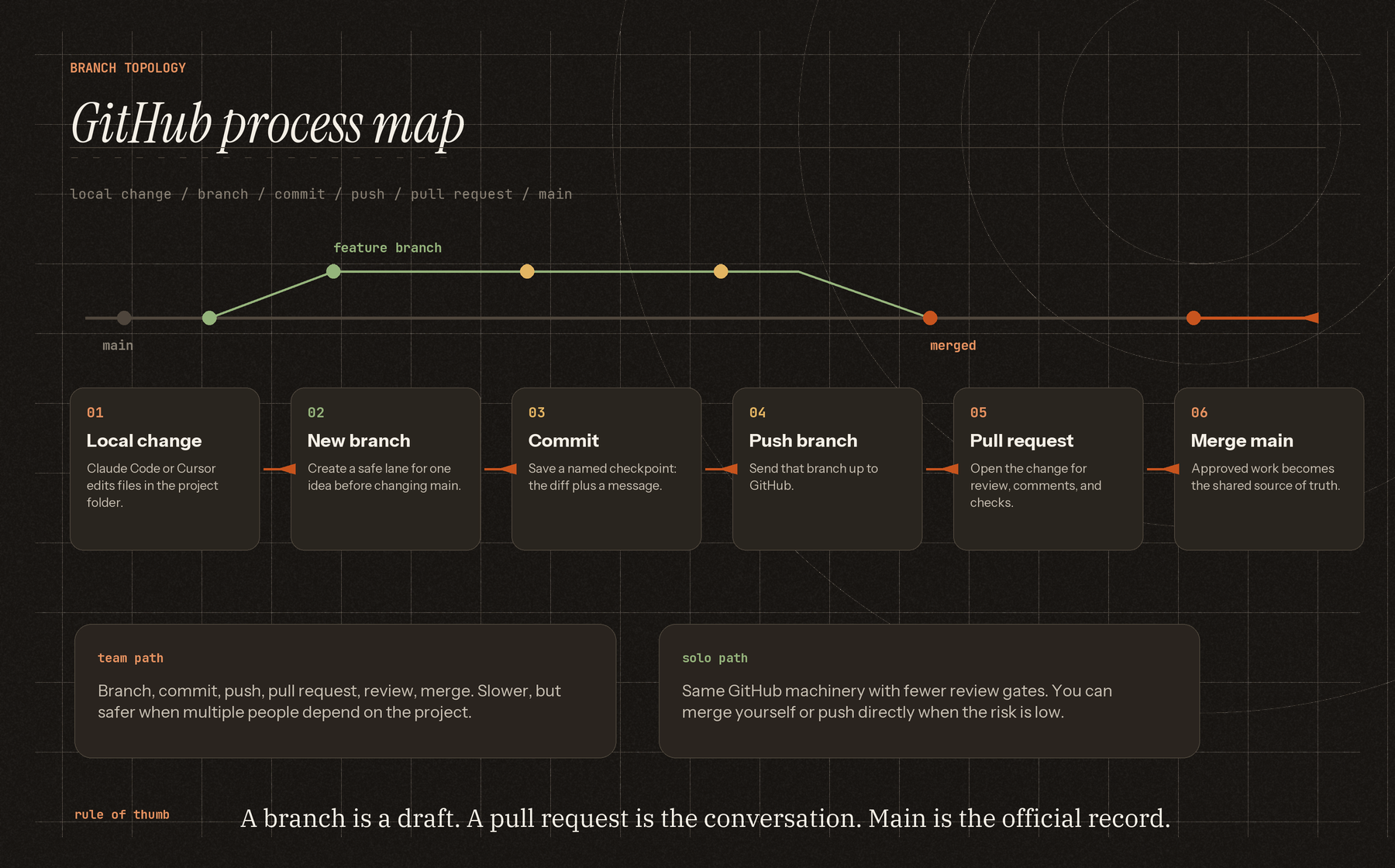
Infographic showing the GitHub process from local change to new branch, commit, push branch, pull request, and merge to main.
team workflow

Vercel deployment path

The slower team path is worth learning first because it shows all the pieces: local work, branch, pull request, merge to main, then Vercel auto-deploys the merged code. Click for the full-size canvas.
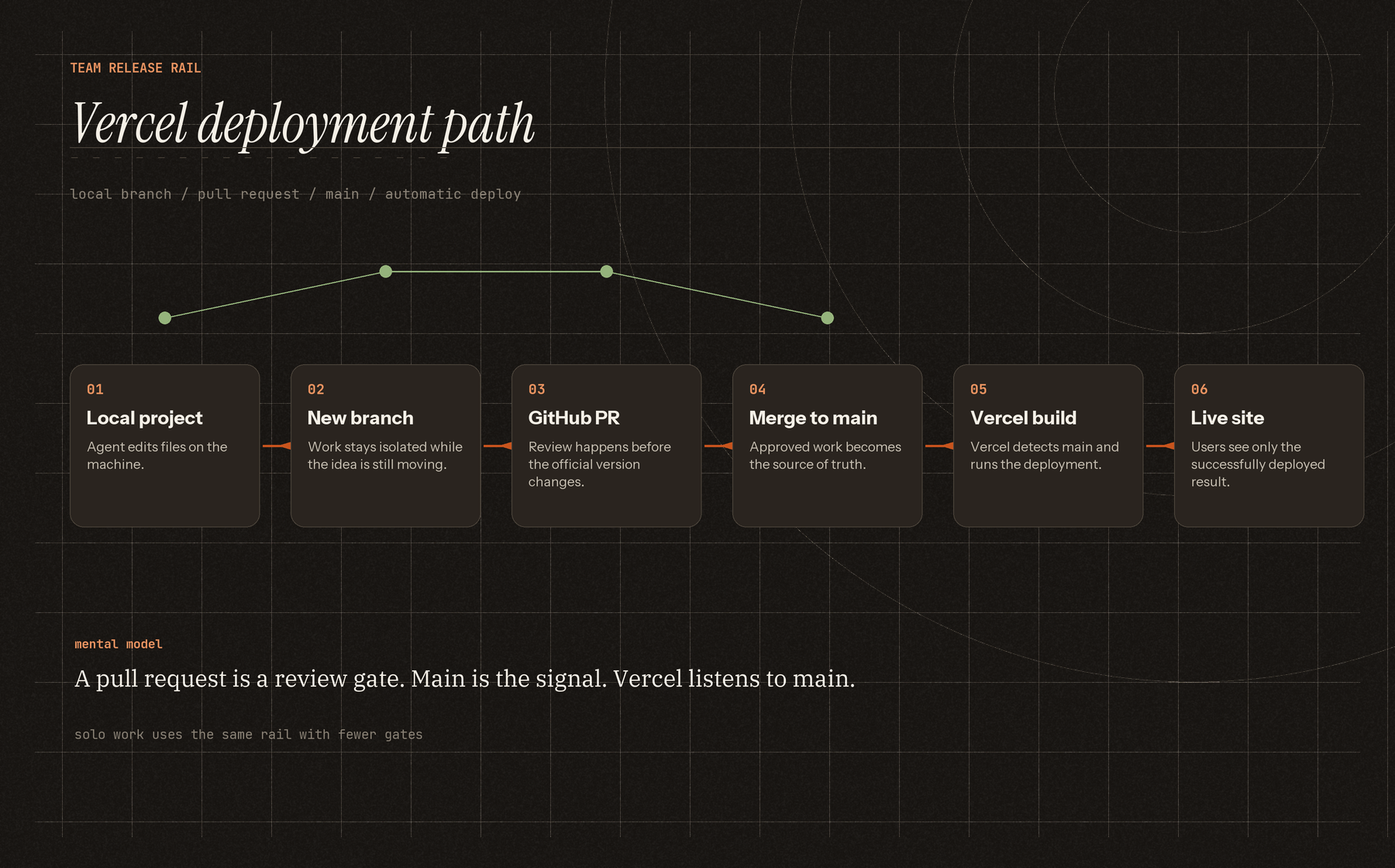
Infographic showing the Vercel deployment path from local project to new branch, GitHub pull request, main merge, Vercel build, and live site.
solo workflow

The shortcut path

If you are working alone, the pull-request ceremony can be lighter. You can merge your own branch or push directly when the risk is low.
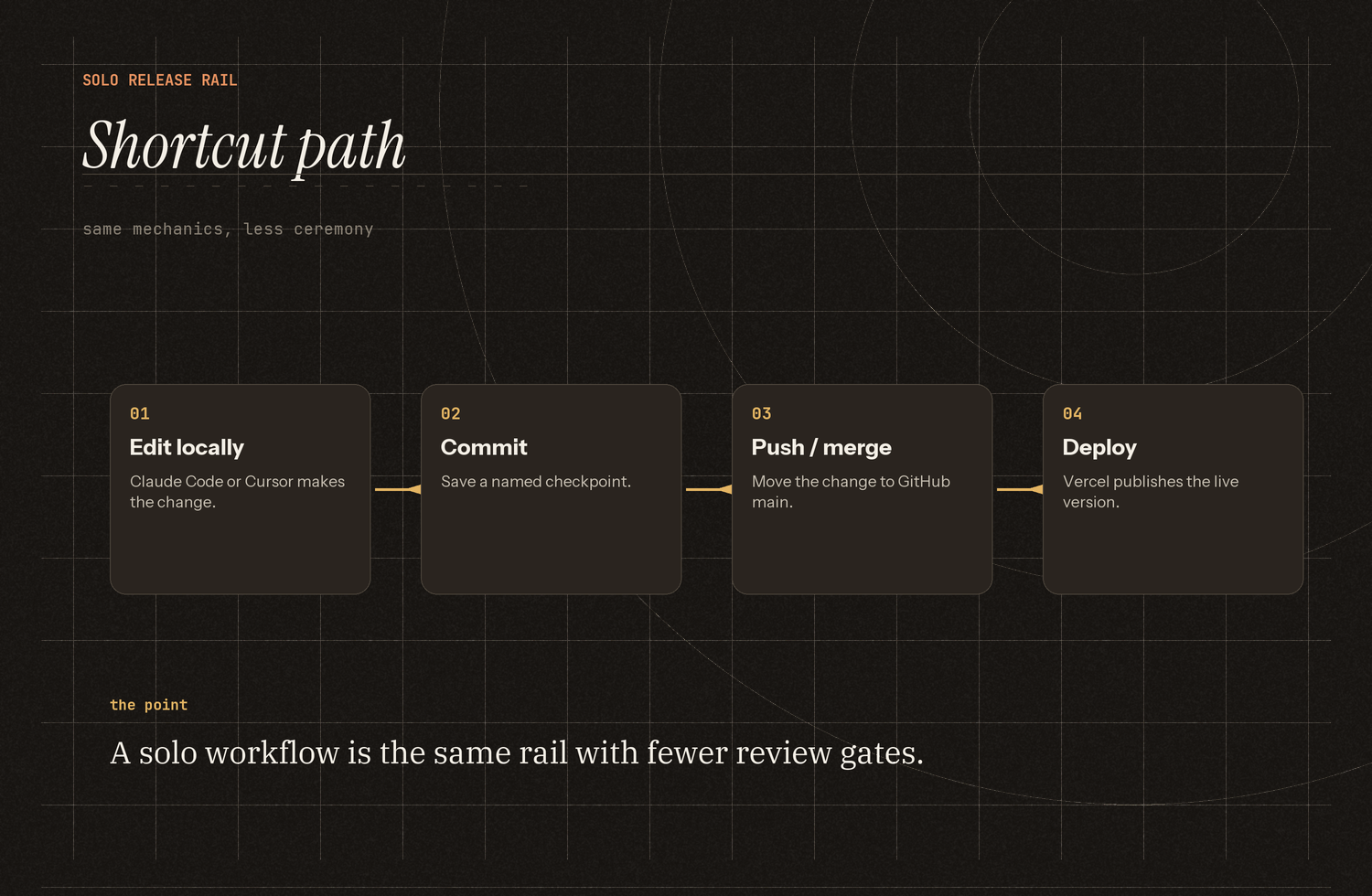
Infographic showing the solo shortcut path: edit locally, commit, push or merge, deploy.
what lives where

Local, GitHub, Vercel

This is the mental model to keep repeating: your computer is where work happens, GitHub is the shared source of truth, and Vercel is where the app runs.
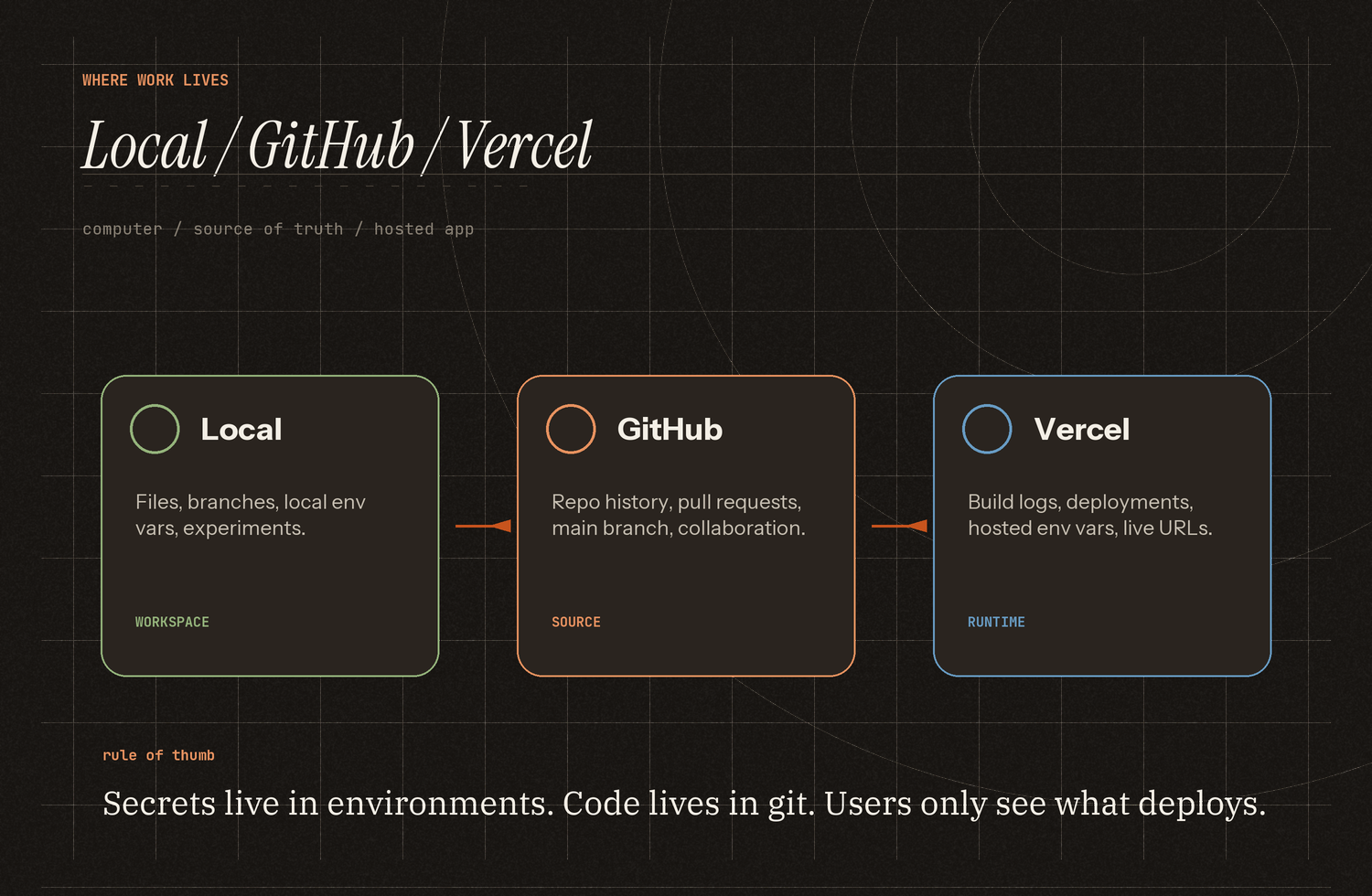
Infographic explaining where work lives across local files, GitHub, and Vercel.
runtime boundaries

Code, secrets, and the browser

The Session 04 visual: code lives in GitHub, secrets live in environments, Vercel runs the app, Supabase stores data, ElevenLabs runs the agent layer, and users only see what deploys.
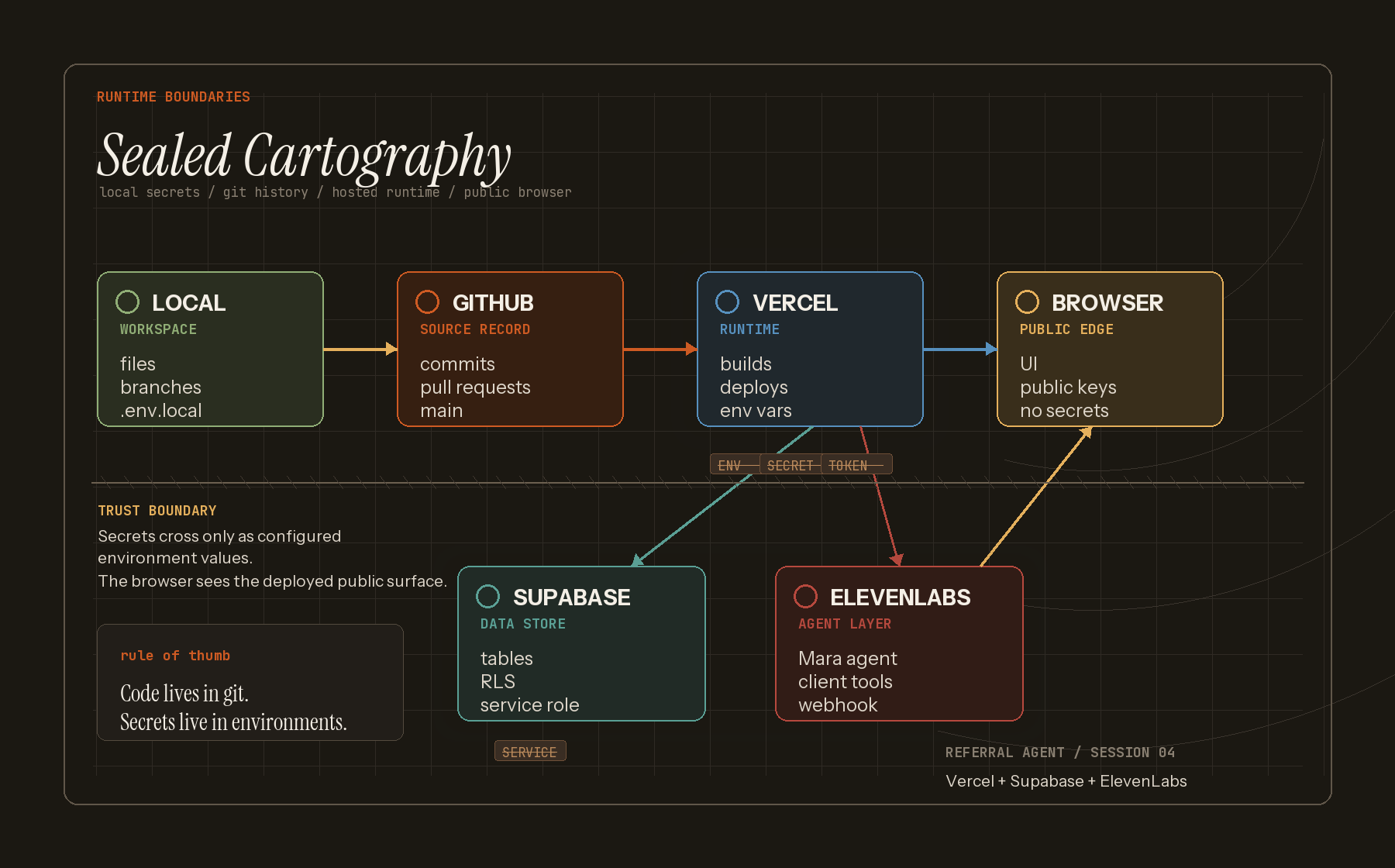
Infographic mapping local files, GitHub, Vercel, Supabase, ElevenLabs, and the browser as runtime boundaries for code and secrets.
resource index

Diagrams to use as we go

Keep the page as a small library of explainers: some already exist, some should be made when the topic comes up in session.
Sessions

newest · first
04

5/26 build · deployment handoff

Referral agent — build + deploy

Took the referral-agent plan into a real Next.js app: public interview flow, admin dashboard, Supabase schema, ElevenLabs agent/tool configs, Vercel env wiring, GitHub commits, BotID, and the last-mile deployment checklist.

session notes → runtime boundaries → vercel + supabase + elevenlabs

read the session →

03

5/20 build · paused at 00:47

Referral agent — something fresh

Tanner picked the project: a hiring referral agent. Twenty-five minutes deciding the idea, ten minutes walking the stack, ten minutes watching Claude draft the architecture in plan mode. Then a candidate call pulled Tanner away — clean stop point with a plan ready to run.

next.js on vercel elevenlabs agent + supabase paused at plan-mode

read the session →

02

5/10 build → 5/11 feedback

Interview training clips — and the loop

Generated three two-voice training clips from real interview techniques — challenging reframes, scope-broadening follow-ups, constraining answers. Then closed the loop with side-by-side build notes and feedback on what was confusing.

read the session →

01

5/5 build

Two-voice interview generator

Turned timestamped two-speaker transcripts into a single MP3 with distinct ElevenLabs v4 voices. Includes four sample outputs comparing segment vs. dialogue modes, v3 vs. v4. The whole dev conversation is preserved in the repo.

4 audio samples segment + v4 default elevenlabs v4 expressive

read the session →

Read further

repo · receipts · references